


Introduction
Recently, I built my first Agentic RAG workflow using LangGraph. I shared the code and setup steps in this GitHub repo.
Today, I'm publishing a full video walkthrough of this Agentic RAG implementation.
This video is intended for those who are already familiar with basic RAG workflows but haven’t yet explored Agentic RAG. My goal is to help you get started with your first Agentic RAG project.
Agentic RAG vs. Vanilla RAG: Key Differences
Before diving into the code, I want to explain some foundational concepts that helped me understand Agentic RAG and how it differs from vanilla RAG workflows.
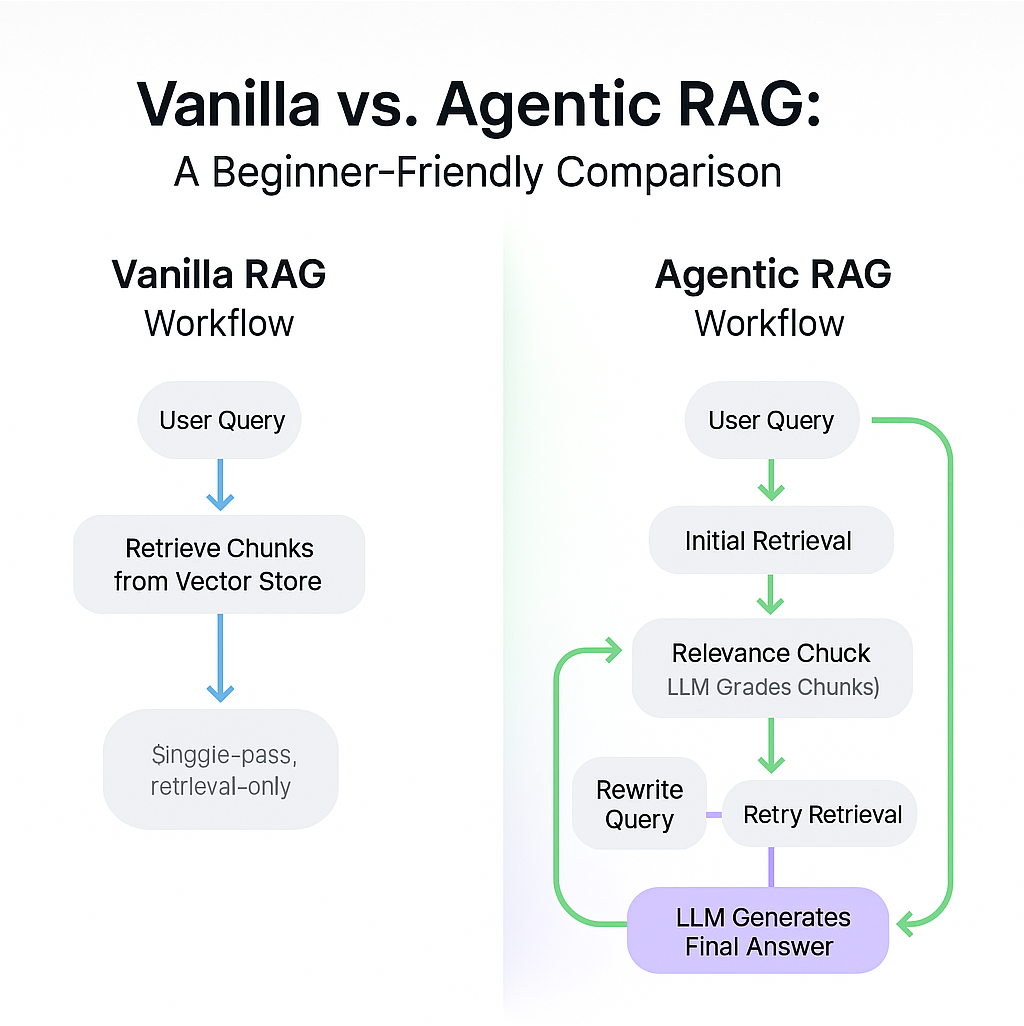
Vanilla RAG Workflow:
A sequence of steps.
User submits a query to an LLM app (e.g., chatbot).
App retrieves relevant chunks from a vector store.
App sends an augmented prompt (original query + retrieved context) to the LLM.
LLM returns a response.
Limitations:
The process is static.
If the original query is poorly worded, or if retrieval results are weak, there's no recovery mechanism.
The LLM is only involved at the end.
Agentic RAG Workflow:
Involves the LLM throughout the workflow.
After the initial retrieval, the LLM assesses the quality of the retrieved chunks.
If chunks are not highly relevant to the query, the LLM rewrites the query and retries retrieval.
This loop continues until relevant content is found.
Then, the LLM generates the final answer using the relevant chunks
This dynamic, decision-making process powered by the LLM is what makes the workflow “agentic.”
My Implementation: Improvements and Simplifications
I started with an LangChain tutorial on Agentic RAG with LangGraph:
Agentic RAG with LangGraph: https://langchain-ai.github.io/langgraph/tutorials/rag/langgraph_agentic_rag/
Then, I made a few key changes in the original tutorial:
Local Embeddings with Llama.cpp
I replaced OpenAI’s embedding generation with a local embedding model using Llama.cpp and the Granite text embedding model. You can switch to any Hugging Face-compatible model in Llama.cpp format.Cleaner Web Document Retrieval
The original tutorial usedWebBaseLoader, but I found it noisy (extra newlines, artifacts). I switched to a different library that gives cleaner web content. While I didn’t explore allWebBaseLoaderconfig options, switching to another library was quicker and more effective for me.Sentence-Aware Chunking
The original used character-based chunking, which can split in the middle of a sentence. I replaced this with sentence-based chunking for better coherence.LLM Optimization
I reused the LLM instance throughout the workflow instead of re-instantiating it multiple times.
Repo and Setup Instructions
You’ll find the complete project and the macOS setup instructions here:
🔗 GitHub repo: https://github.com/shaikhq/agentic-rag-basic
Workflow Overview
The RAG pipeline is implemented in a notebook: agent.ipynb.
I use my blog post titled “A Step-by-Step Guide to Building a Linear Regression Model in IBM Db2” as the sample knowledge base for the RAG pipeline.
Chunking
Chunks: 200 words max, 50-word overlap.
Rationale: Overlap helps maintain context coherence when LLM stitches chunks together.
Vector Store and Embedding
Local Granite embedding model via Llama.cpp.
In-memory vector store created.
A retriever tool is built on top of this store.
LLM for Answer Generation
I used Watsonx.ai’s Mistral-large model.
Can be replaced with another provider or a local model.
Pipeline Functions and Prompts
I defined several key components:
Query or Respond Decision
Determines whether to retrieve more content, rewrite the query, or end the workflow.Relevance Grading
Prompt instructs LLM to score retrieved chunks as relevant or not, using a yes/no format.Query Rewriting
Reformulates the user query to improve retrieval quality.Answer Generation
Prompt guides the LLM to answer concisely (max 3 sentences). If it doesn’t know the answer, it says so.
These are the building blocks of the Agentic RAG pipeline.
Visualizing the Workflow
I created a LangGraph visual representation of the workflow.
Steps in the graph:
generate_query_or_respondretrieverewrite_questiongenerate_answer
Conditional logic controls transitions between these steps based on relevance grading.
Testing the RAG pipeline: Questions and Responses
Query 1:
“How to calculate summary statistics in Db2?”
→ Workflow runs → Final answer generated by LLM.
Query 2:
“How to build a linear regression model with IBM Db2?”
→ Workflow runs → Final answer generated by LLM.
Conclusion
That concludes my walkthrough and demo.
Thanks for reading/watching—and have fun building your own Agentic RAG pipelines using LangGraph!