


In Part 1, I covered what an ontology is, why AI agents need one to query relational databases accurately, and what NVIDIA Auto Ontology is. This part looks at how Auto Ontology builds an ontology, what each model does, and how its agent answers a question. The examples use the same sample database, Microsoft’s Wide World Importers.
How Auto Ontology builds an ontology
Auto Ontology works like a new analyst exploring an unfamiliar database with nobody to ask. It reads what’s there, looks at the data, and writes down what it thinks things mean. Experts can then check its work.
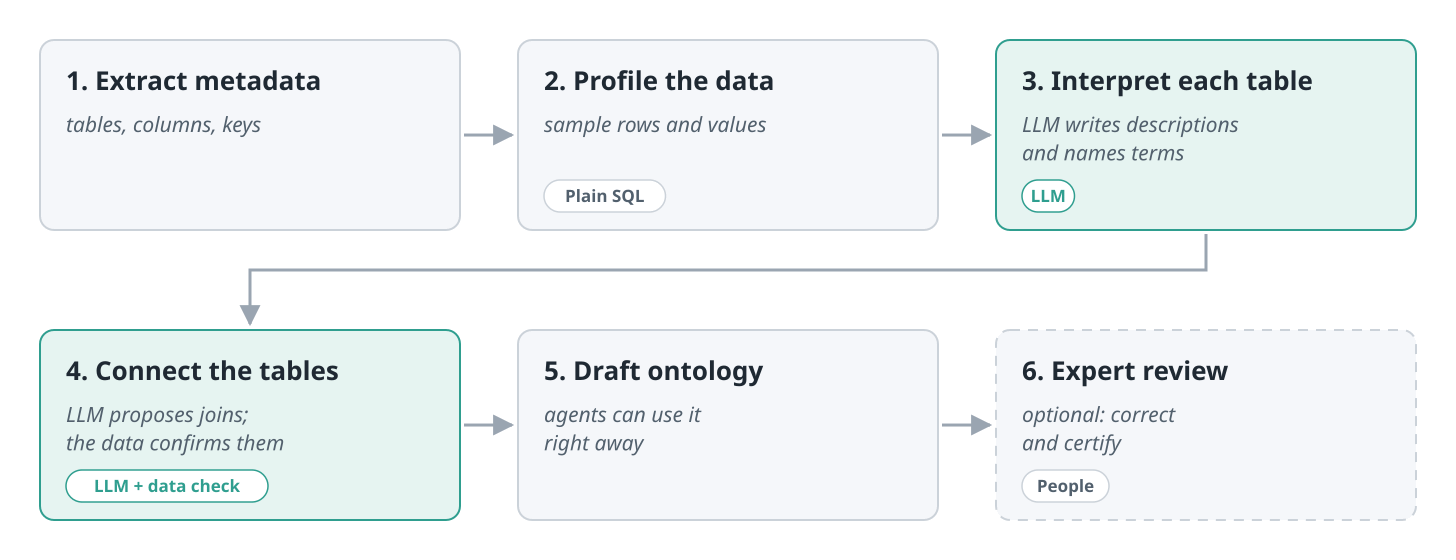
Stage 1: Extract metadata
NVIDIA calls this stage catalog ingest. Auto Ontology reads the database’s tables, columns, data types, keys and views, and indexes the tables and columns for search with an embedding model. No interpretation yet.
Stage 2: Profile the data
Plain SQL samples up to 1,000 rows per table and records the most common values, distinct values and date formats. No LLM is involved.
Stage 3: Interpret each table
An LLM (by default NVIDIA’s hosted reasoning model, nvidia/nemotron-3.5-lightning-30b-a3b) reads the name, data type and most common sample values of each column that isn’t a foreign key, and writes a one-sentence business description of the column. The LLM is told to stay factual: “no speculation”. The LLM then names a business entity for the table (usually one per table, such as Invoice Line) and gives each column a friendly label. This stage is where the meaning comes from: the LLM’s interpretation, not a person’s. A later pass writes a second description of each column, with its relationships in view.
Stage 4: Connect the tables
Keys the database declares are used as-is. For a column that looks like a reference but has no declared key, the LLM proposes the key column that the reference column links to, and Auto Ontology keeps the proposed link only if joining on the two columns actually returns data.
Stage 5: Draft ontology
The draft is stored in Auto Ontology’s own Postgres database. This internal database is separate from the database the ontology describes, which can be Postgres or another engine, such as Snowflake or MySQL. In NVIDIA’s quickstart, the two are separate databases on the same Postgres server. Agents can answer questions from the draft immediately, before any review. Nothing is flagged as uncertain: every generated item starts as Pending Approval, whether the model was confident or not.
Stage 6: Expert review (optional)
Subject matter experts test the draft with real questions, correct terms, descriptions and calculations, and certify the parts that are right. Corrections change answers right away and are kept when the ontology is rebuilt, except the choice of default join between two tables, which is re-chosen on every rebuild. Certifying only adds a label that tells people a part was reviewed. The agent doesn’t use this label when it searches. Experts can also contribute outside these stages: by importing an existing ontology before the build, or by adding glossary definitions, which the agent uses when answering questions.
NVIDIA calls a concept a term, and a metric a SQL attribute.
Concepts, mappings, relationships and lineage are generated automatically. Metrics are the part least likely to appear: Auto Ontology suggests metrics mainly from past queries, where the database exposes its query history, and for bridge tables.
Model view
Three models build the ontology, and each does a different kind of work:
an embedding model
a reasoning LLM
a reranker
The embedding model (by default nvidia/nemotron-3.5-embed-1b) is the index. It turns names and descriptions into vectors where similar meanings sit close together, so they can be searched by meaning. A search for “buyers” can find the Customer entity, though no name contains “buyer”.
The reasoning LLM (by default nvidia/nemotron-3.5-lightning-30b-a3b) is the analyst. It reads names and sample values, and writes what things mean. Given isundersupplybackordered (boolean), samples: true, it writes a one-sentence description of the column. It names the table sales.invoicelines Invoice Line.
The reranker (by default nvidia/nemotron-3.5-rerank-8b) is the tie-breaker. It has one job. For a bridge table such as order_products(order_id, product_id), Auto Ontology writes the join as ready-made SQL, and the reranker decides whether that SQL is filed under Order or Product. The reranker picks the entity whose definition best matches the SQL’s description.
The examples are illustrations, not logged output.
The models work toward one goal: producing a business vocabulary for a database that an agent can use to turn a natural-language question into SQL. The diagram below numbers the model steps 1 to 6; these are not the same as the six stages above. Each row shows what a step’s model receives and returns.
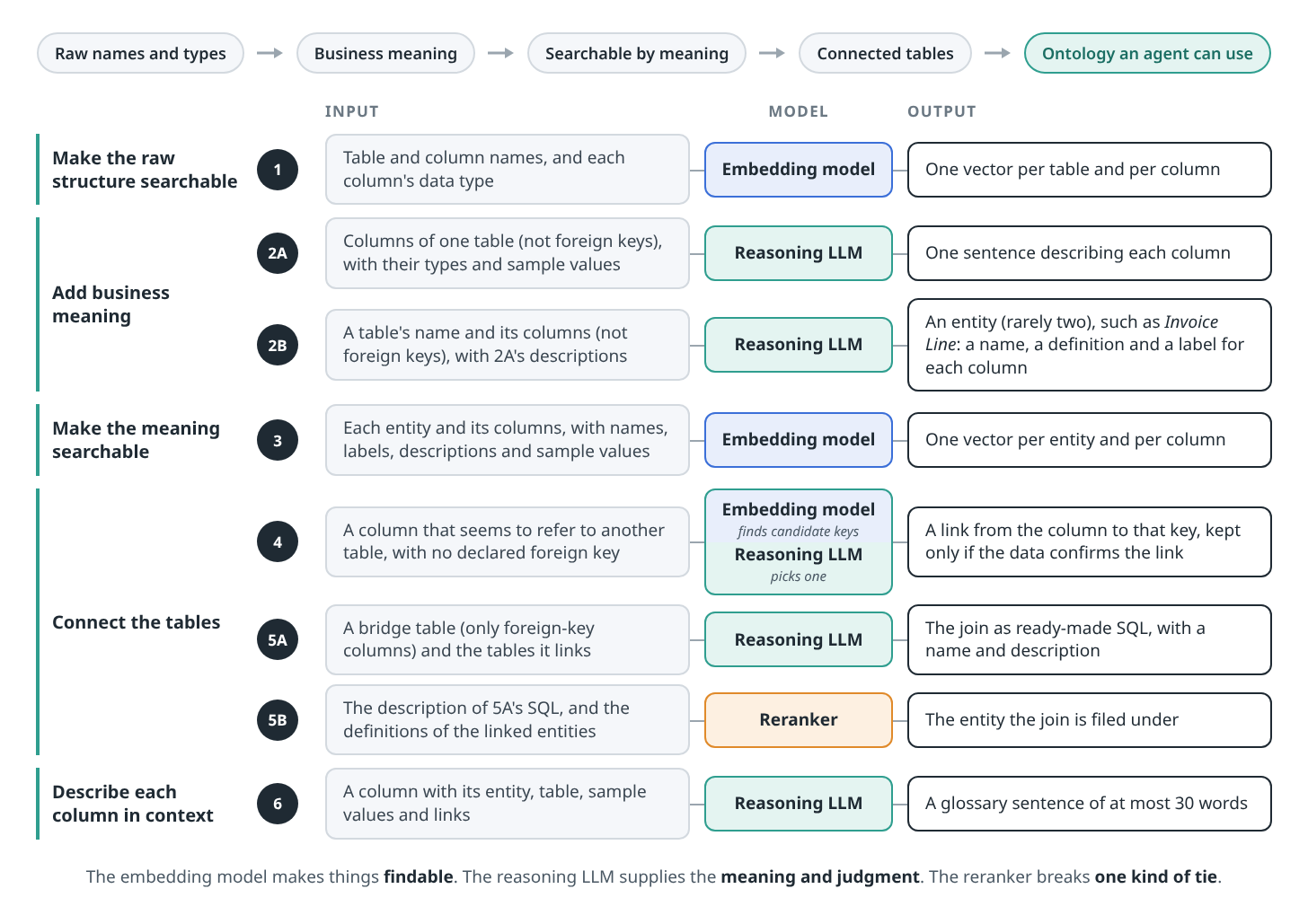
In step 1, the raw structure becomes searchable: one vector per table and per column, from text built from names and data types. A table’s text includes its list of columns, and each column also gets a text of its own. Before the ontology exists, this index, plus a search by name, is all the agent can search.
In step 2A, the columns get business meaning: one sentence each. The LLM works on one table at a time. That table’s columns, excluding foreign keys, are sent in batches of up to 15 columns per call, so every column in a call comes from the same table, and a table with more columns gets several calls, one after another. Each column carries its 5 most common values from the 1,000-row sample. If a text column shows fewer than 5 distinct values in that sample, it is likely a category column, such as a status, and the sample may have missed its rare values. Auto Ontology then looks up the column’s full list of distinct values and adds them, as long as there are 25 or fewer.
In step 2B, each table becomes an entity, such as Invoice Line, with a definition and a label for each column. Step 2B makes one call per table, showing the LLM the table name and up to 40 of its columns, excluding foreign keys, each with its one-sentence description from step 2A.
In step 3, the business vocabulary from steps 2A and 2B becomes searchable. This vocabulary is the entities, with their names and definitions from step 2B, and their columns, with the labels from step 2B and the descriptions from step 2A. Step 1’s index knows only the database’s raw names and types; step 3 builds a second index of this vocabulary, so a question that says “customers” or “invoice lines” lands on the right entity. The embedding model receives one text per entity and one text per column. An entity’s text has only the entity’s name and definition. A column’s text has the column’s label, the name of its entity, its description and its sample values. The texts for one entity and its columns are sent together in one batch, and the model returns one vector per text: one for the entity and one for each of its columns.
In step 4, the entities become connected. Earlier, the LLM flags columns that likely refer to another table, such as customer_id. For a flagged column with no declared foreign key, step 4 searches the step 3 vectors for the key column that the flagged column refers to, and the LLM picks one. Auto Ontology keeps the link only if most of the column’s values are found in that key and a join on the two columns returns data. Declared foreign keys are copied from the schema and skip this step.
In step 5A, the LLM writes a bridge-table join. A bridge table is an existing table with two or more columns, every one of which links to another table’s key, so the table links entities many-to-many. Each link can be a declared foreign key or one inferred in step 4. The LLM receives the table and its links, and writes the many-to-many relationship as ready-made SQL, with a name and description, so an agent doesn’t have to work out the join through the bridge.
In step 5B, the reranker files the join SQL from step 5A under one of the entities the bridge table connects, because the bridge table has no entity of its own. The agent then finds the join through that entity. Nothing is written to your database.
In step 6, each column gets a glossary sentence written in context. By now, step 4 has added the inferred links, so every link between tables is known: the declared foreign keys from the schema and the links inferred in step 4. For each column of an entity, the LLM sees the entity, the table, the column’s description from step 2A, its sample values and its links, and writes one business-glossary sentence of at most 30 words. Step 2A described each column on its own; step 6 describes the column as part of the whole model, for example as “identifies the customer who placed the order”.
The step-6 sentence is for understanding a column, not for finding it. Search uses the step 3 vectors, which include the step 2A descriptions. Once the agent has found a column, the step-6 sentence helps the agent understand that column in two cases. First, when someone asks what the data means, the agent answers from these sentences. Second, step 2A skips foreign keys, so when the agent writes SQL that uses a linked foreign key, the agent sees the step-6 sentence of the column the foreign key links to.
In short, the embedding model makes things findable, the reasoning LLM supplies the meaning and the judgment, and the reranker chooses the entity that each bridge-table join is filed under.
My interpretation: the reranker plays a minor role. In step 5B it only decides which of the connected entities a bridge-table join is filed under. The reranker doesn’t change the join, the relationship stays visible from both entities, and the SQL can still be found by searching. The reranker runs only for tables made entirely of foreign keys, and never when answering questions, so it isn’t used for the sample database. Filing the join under every entity the join connects would be a reasonable alternative.
The fourth model role, the non-reasoning LLM, isn’t used to build the ontology; it helps when answering questions.
How a question is answered, without and with an ontology
The Auto Ontology agent turns a natural-language question into a SQL statement. The agent can do this with or without an ontology. Without an ontology, the agent’s search gives it only the structure of the data: table and column names, data types and keys. When an ontology is available, the search gives the agent more context: the business meaning of the data, through the entities, their columns and their descriptions.
The agent works in a loop. In each step, the LLM decides which of the three tools below to call, and it can call the same tool many times. Auto Ontology’s backend runs each tool call and returns the result to the LLM. Each time the LLM decides, it has the question and every earlier tool call and result in front of it.
Search takes a short query that the LLM writes from the user’s question, such as “customers with backorders” or an exact column name, and finds the tables and columns that match, by meaning (using the step 3 vectors) and by name. The results include each table’s and column’s description, stored values and links, and how the tables found so far join together.
Run a query lets the LLM test SQL before giving an answer, for example to see the distinct values in a status column or to try a draft query. Before running the query, the backend checks that every table and column name exists and suggests the closest real name for any that doesn’t. The backend then runs the query without changing any data and returns up to the first 100 rows.
Submit hands in the final query. The backend runs the same name checks and then runs the query. If the query runs without errors, the result is the answer. If not, the error goes back to the LLM to fix.
The loop ends when a submitted query passes the backend’s checks and runs without errors. To keep the loop from running forever, the agent has a limit of 24 tool calls by default. When the limit is reached, the LLM gets one final call, which can only submit a query. If that query also fails, the agent reports that it couldn’t answer the question.
For “How many customers had backorders?”, here is how the SQL typically gets written.
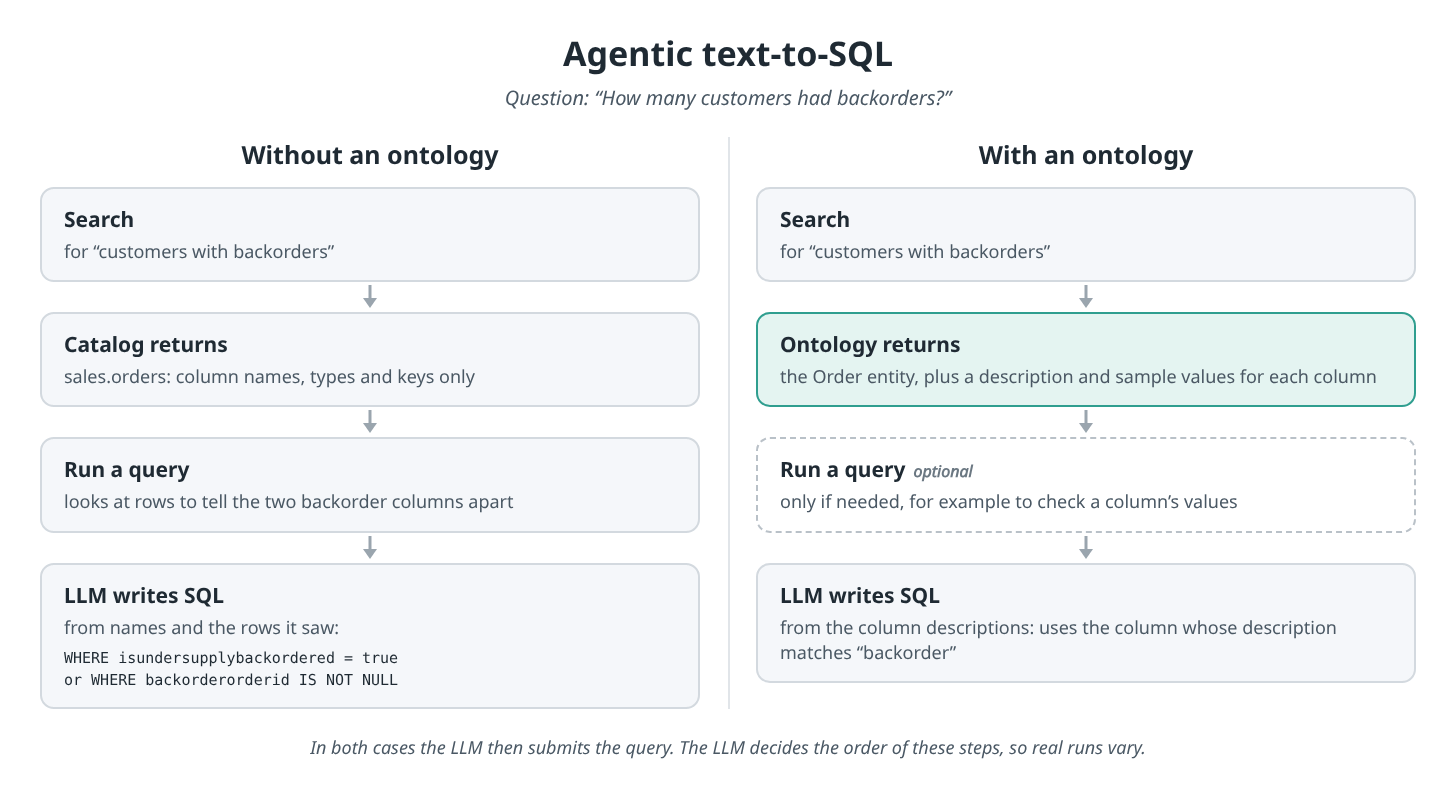
Without an ontology, the search returns no descriptions and no sample values, because both are produced while the ontology is built. The LLM must infer from the names isundersupplybackordered and backorderorderid which one means “had a backorder”, or spend tool calls looking at the data.
With an ontology, the same search also returns a description and stored sample values for each of those columns, so the LLM can pick the column by its meaning.
In both cases the search also returns how the tables it found join together. Without an ontology, this join information comes only from declared foreign keys; with an ontology, it also includes links the LLM inferred and the data confirmed.
The ontology adds information, but the LLM still makes the choices, and an LLM wrote much of that information: the descriptions, the entities and the glossary sentences. The draft doesn’t flag which parts might be wrong, so the agent’s answers are only as good as those descriptions. That is why the expert review in stage 6 matters: each correction a person makes changes the agent’s answers right away.
With an LLM writing the draft, Auto Ontology cuts down the manual work of building an ontology. Experts then correct and certify that draft. Together, the two give the agent an ontology it can rely on, which increases the chance that a natural-language question turns into accurate SQL.
This series is independent and not affiliated with NVIDIA. Auto Ontology is NVIDIA’s, licensed under Apache-2.0. Wide World Importers is Microsoft’s sample database, licensed under MIT. The descriptions of how Auto Ontology works come from NVIDIA’s README, its documentation and its source code, at a pinned commit.