


The last time I learned how a computer stores the letter “A,” I was an undergraduate at North South University in Bangladesh. It was 2000. I had a notebook full of binary arithmetic and a working sense of what a byte was.
Then life happened. Advanced courses. A career. A move into AI architecture. The fundamentals didn’t go anywhere; they got covered over by everything I learned after them. Twenty-five years is a long time to let a foundation sit unused.
Most days, that doesn’t matter. I’m thinking about embeddings, retrieval pipelines, system architecture. I almost never think about the byte. But I’m currently designing a RAG solution, and as I worked through the design, I ran into a fact I had been quietly assuming away: not all the source data is in English. Some of it sits in databases built for other languages, encoded in ways that aren’t UTF-8 and aren’t always obvious from the outside. That raised a set of questions I couldn’t answer cleanly: how is the text actually encoded in the source database? What does it look like at the byte level? What happens when something downstream assumes one thing and the source provides another?
So today I went back. I opened a chat with an AI and asked the simplest questions I could think of, one after another, until the rust came off. How does a computer store the letter A? Where do bytes enter the story? How does it know where one string ends and the next begins? The concepts I had filed away in 2000 came back, slowly, just as clear as the first time.
This post is that refresher.
What you’ll get
If you took CS courses once and haven’t touched this material in years, I want this post to do one thing: rebuild your mental model of how English text lives in a computer. From the keystroke to the disk. By the end, you’ll see the bytes under your strings, and you’ll notice when an assumption you’ve made for years quietly stops holding.
The scope is narrow. English only. Not Unicode. Not multi-byte encodings. The moment text from other languages enters the picture, a lot of these assumptions break, but that’s a separate conversation. This post is the foundation everything else sits on.
1. Characters are numbers
A computer doesn’t know what “A” is. It only stores numbers. So someone had to decide: when you press A, what number gets saved?
That decision lives in a table called ASCII:
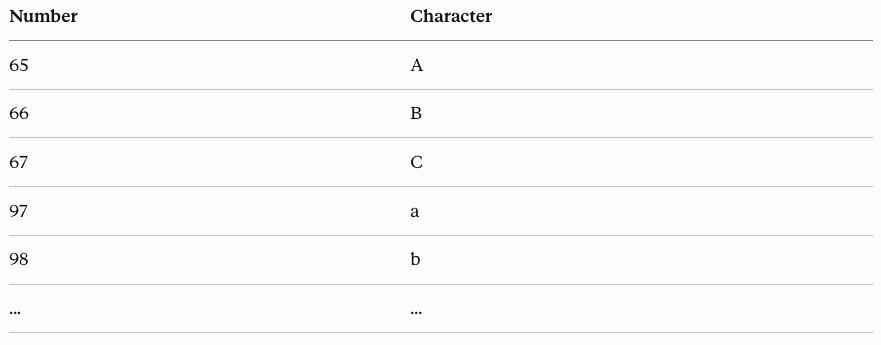
Press A. The system translates that to 65. The computer stores 65.
The table isn’t stored alongside the data. It’s an agreement between whoever wrote the bytes and whoever reads them. The byte on disk is only a number. The byte becomes “A” only because the program reading it agrees to interpret it that way.
2. Bytes: the container
A byte is 8 bits. A bit is a 0 or a 1. Eight switches in a row give you 2⁸ = 256 values (0 through 255).
Here’s 65 in bits:
0 1 0 0 0 0 0 1Each position is a power of 2: 128, 64, 32, 16, 8, 4, 2, 1. Add the 1-bits: 64 + 1 = 65. That’s the letter A as it actually exists on disk.
ASCII was originally a 7-bit code, defining 128 characters: enough for English letters, digits, punctuation, and a handful of control codes. When 8-bit bytes became the standard, the upper 128 values opened up. Different countries filled those slots with their own characters. Japanese and Chinese have far more than 256 characters in total, so those languages can’t fit in a single byte at all. They have to use multiple bytes per character.
For English, one byte per character is enough. Every English-only system quietly leans on that assumption.
3. Everything is bytes
Bytes have no type. Photos, audio, integers, structs, ML model weights, all of it is just sequences of bytes. The byte itself is dumb. It holds a number from 0 to 255 and nothing else.
What changes from one kind of data to another is two things: how many bytes you use, and what rulebook you read them with.
One English letter: 1 byte
A 32-bit integer: 4 bytes
A model weight tensor: gigabytes
Across all of those, the bytes look identical. The program reading them brings the meaning. Same bits, different agreement, different interpretation.
This is why production bugs happen. A file opens with the wrong parser. A packet is misaligned. A text column gets handed binary data. The bytes were fine. The agreement broke.
4. From one character to a string
If “A” is one byte, “Hello” is five bytes in a row:
H     e     l     l     o
72    101   108   108   111
Five numbers. That’s the whole string. The computer sees a row of bytes and treats them as text because the program told it to.
Spaces, tabs, and newlines are characters too. They have ASCII numbers and take up bytes, exactly like letters do.
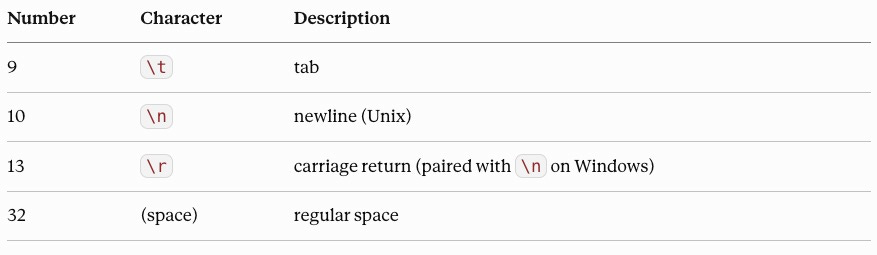
"Hello World" is 11 bytes, not 10. The space counts. "Hello\n" is 6 bytes, not 5. The newline counts. They're characters, with byte values like everything else.
We treat these as structure. Underneath, they’re content.
5. Where does a string end?
Two strings sit next to each other on disk: “Hello” and “World.”
72 101 108 108 111 87 111 114 108 100How does the computer know “Hello” ends after the fifth byte? There’s no fence. No separator. Just numbers in a row.
Computer science settled on two answers.
Strategy 1: Length-prefixed
Store the length first, then the content:
[5] 72 101 108 108 111   [5] 87 111 114 108 100
 ↑                        ↑
 "next 5 bytes            "next 5 bytes
  are one string"          are one string"
The reading program, called the reader, sees 5, counts off 5 bytes, knows the string is done. Any byte value, including 0, can sit inside the string.
This is what modern systems use. Databases. Network protocols. The string types built into modern programming languages.
Strategy 2: Null-terminated
Pick a special byte to mean “end.” Traditionally, the byte 0, the null byte.
72 101 108 108 111 [0]   87 111 114 108 100 [0]
                    ↑                        ↑
                  "stop"                   "stop"
The reader scans until it hits 0. This is how C represents strings.
The serious limitation: you cannot store the byte 0 inside the string. The moment the reader sees 0, it thinks the string ended. Text never contains a byte 0, so this works for strings. Binary files like images and archives are full of zeros, so it doesn’t.
That’s why modern systems went length-prefixed. You spend a couple of bytes on the length. In exchange, any byte value can live in the string, and you don’t have to scan to find the end.
6. Bytes don't tell you what they are
In a length-prefixed string, the length byte and the content bytes look identical. The byte 5 (00000101) and a content byte holding the value 5 are the same eight bits. So how does the computer know byte 1 is a length and not a letter?
The computer doesn't know from the bytes. It knows from position.
The rule “byte 1 is a length” doesn’t live in the data. It lives in the code reading the data. The format spec, the database engine, the protocol definition told the program: “byte 1 is a length.” That’s the agreement.
Lose the agreement and you have noise. Open a JPEG as a Word document. The bytes are valid. Word is reading them under the wrong format.
This is why file formats are specifications. PNG starts with a specific 8-byte signature. Database row layouts are defined down to the byte. The bytes are always just bytes. The format is the contract.
Tokenizers are agreements about how to split byte sequences into tokens. AI model weight files are bytes interpreted under a fixed schema. When the agreement between writer and reader breaks, you get bugs that don't show up in unit tests, because the bytes themselves are valid.
7. What I took away
English is the easy case by design, not by accident. ASCII was built for English in 1963, and a single byte is more than enough to hold any ASCII character. So in English, one character is one byte. Counting characters and counting bytes give the same answer. English-only systems never have to think about this.
That property stops holding the moment text from other languages enters the system. In other languages, characters often take more than one byte. Character boundaries stop being obvious. Assumptions about length, indexing, and splitting that worked for decades suddenly don’t.
Where this goes from here is harder: multi-byte encodings, Unicode, the point where bytes and characters stop being the same thing. That’s what I’m still working through.