


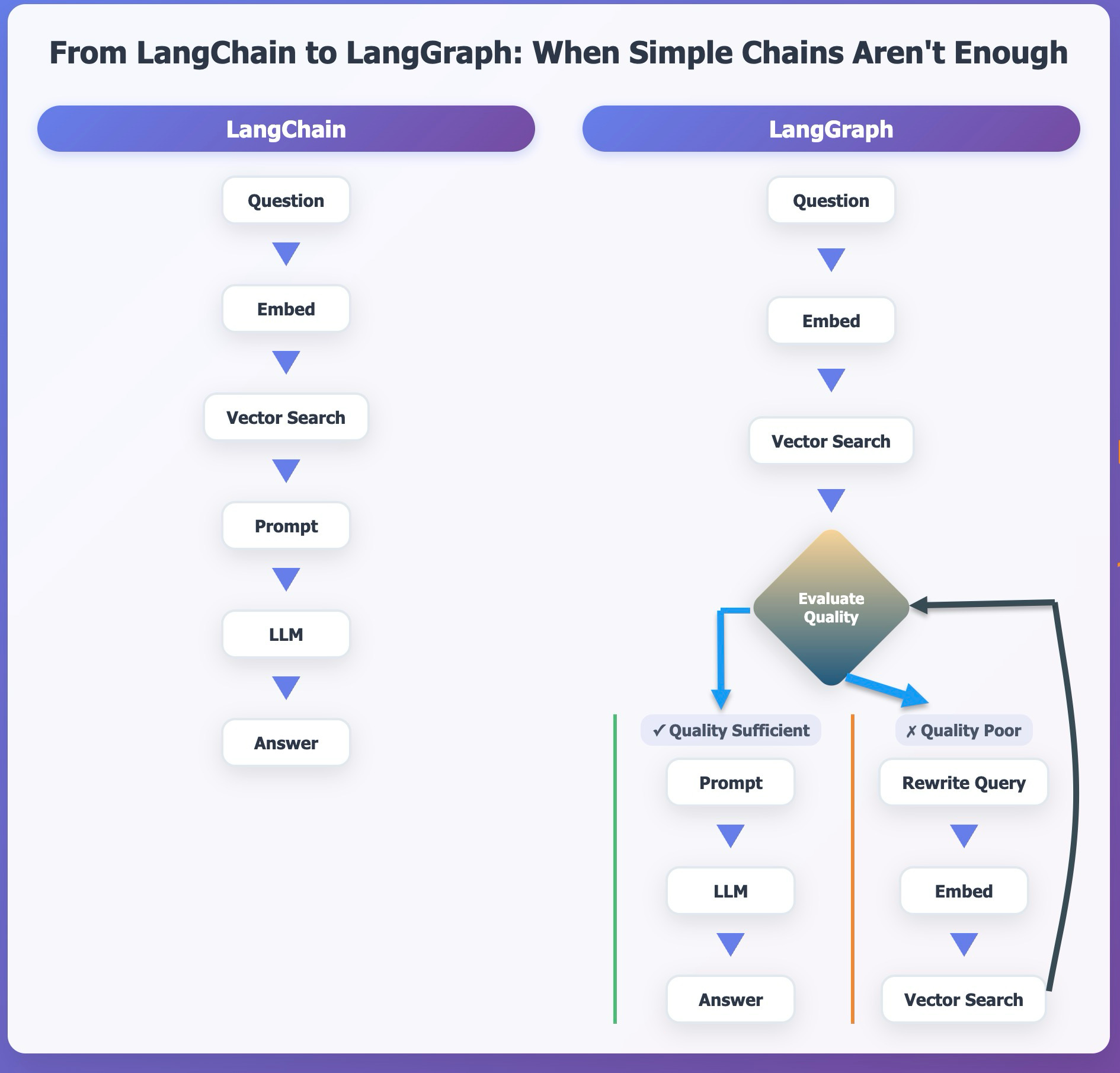
When I began building applications with large language models, LangChain was my starting point. It offered everything I needed to assemble a working system: tools for loading and splitting documents, embedding models for vector search, retrievers to find relevant content, and prompt templates to shape responses.
Using these tools, I built a basic retrieval-augmented generation (RAG) workflow. The steps were straightforward and sequential: receive a question, embed it, search a vector store, fill the context into a prompt, and pass it to an LLM. This kind of linear pipeline—with fixed steps and no branching—matched LangChain's design. For that use case, it worked well.
But as I explored more complex workflows, LangChain began to show its limits. I wanted to evaluate the quality of the retrieved content before sending it to the LLM. If the results were weak, I wanted to revise the question or try a different search method. In some cases, I wanted to retry a step or include a human in the loop. These were no longer simple chains of tasks. They were decisions, conditions, and loops—features that don't come naturally in a linear framework.
At that point, I needed more than a toolkit. I needed a way to orchestrate logic, not just execute steps. That's when I turned to LangGraph.
LangChain and LangGraph: Complementary Roles
LangChain and LangGraph serve different purposes, but they work together.
LangChain is both a tooling ecosystem and a workflow library. It provides integrations with language models, vector stores, embedding tools, document loaders, prompt templates, and more. It also supports basic orchestration, letting you compose linear workflows and agent loops using its Chain, Runnable, and AgentExecutor abstractions.
LangGraph builds on top of this foundation. It does not replace LangChain—it reuses and extends it. All the tools and model integrations offered by LangChain remain available. What LangGraph adds is a graph-based execution model, inspired by state machines, which enables complex control flows. You can define branches, retry conditions, state persistence, and error handling—all within a structured, declarative graph.
In LangChain alone, you can implement similar behaviors, but you must manage logic manually using Python. As your workflow grows, this can become unwieldy. LangGraph helps you organize that complexity using nodes (which represent steps) and edges (which represent conditions and transitions). This makes your workflow easier to reason about and maintain.
Linear vs. Adaptive Workflows
Here's a basic example to show the difference:
LangChain (linear):
Question → Embed → Search → Prompt → LLM → AnswerLangGraph (adaptive):
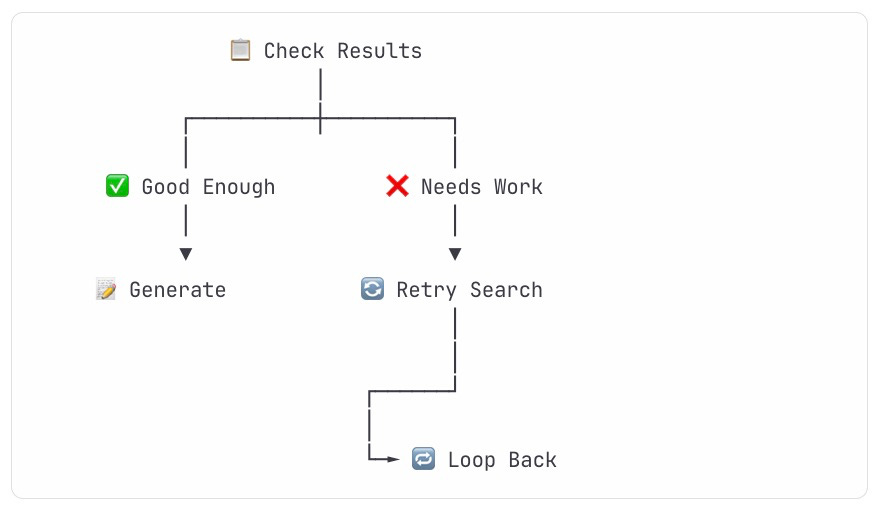
In one of my recent workflows, I needed to verify whether the retrieved content was relevant. If it wasn't, I wanted to reformulate the query and try again, possibly with a different strategy. With LangGraph, I could express this flow directly within the graph. The conditions, retries, and alternate paths were part of the structure—not hidden inside glue code.
Choosing the Right Tool
🤔 Key Decision: Do you need branching, retries, or conditional logic?
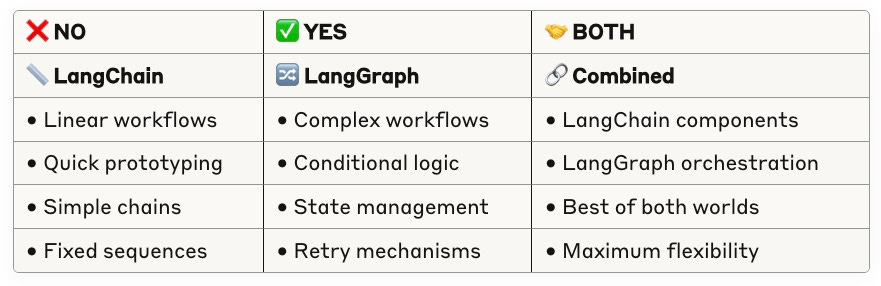
Use LangChain’s workflow when:
Your workflow is linear and predictable.
You don't need branching logic, retries, or persistent state.
You're building a simple prototype or want to test tools quickly.
Use LangGraph when:
Your workflow depends on decisions, loops, or adaptive behavior.
You need to retry steps, rewrite inputs, or fall back to alternate strategies.
You want structure, clarity, and modularity as your logic becomes more complex.
It's important to understand that LangGraph can be used with or without LangChain. While LangGraph can be used standalone, it also integrates seamlessly with any LangChain components. When used together, LangChain gives you the components; LangGraph helps you wire them together in richer ways.
Final Thoughts
LangChain helped me get started. It let me focus on building working pipelines quickly and gave me confidence in integrating LLMs with useful tools. But as my workflows grew more intelligent—needing logic, state, and decisions—I needed more structure. That's where LangGraph became essential.
You don't need LangGraph for every project. But when your workflow is more than just a sequence of steps—when it needs to think, adapt, and respond—LangGraph gives you the framework to do it cleanly and with control.
Structures your workflow as a graph of nodes and transitions for greater transparency and control
Although LangGraph can run standalone, most developers use it alongside LangChain to take advantage of its rich ecosystem. LangGraph doesn't replace LangChain—it extends it, especially when workflows demand smarter behavior.